Oracle estates are often the last and riskiest workloads to leave the data centre. Pairing SkyliftAI MigDB for Oracle with Kiro CLI, the AWS agentic assistant for the command line, turns an Oracle to Amazon RDS migration into a short sequence of plain-language requests, each one checked, approved and recorded.
Why it matters to the business
Database migrations rarely fail on technology. They stall on three business risks: the length of the outage, confidence in the data, and dependence on a few specialists who know the runbook. This approach addresses each one.
Shorter, safer cutover
The data is loaded at a single consistent point while change data capture keeps the target in step, so the application switches over only when replication has caught up.
Repeatable and auditable
Every request, command and result is logged, and the automation resumes from the failed stage instead of starting again.
Less specialist toil
Engineers describe the task; Kiro runs the AWS CLI, the MigDB automation and AWS CloudFormation, and reports back in plain language.
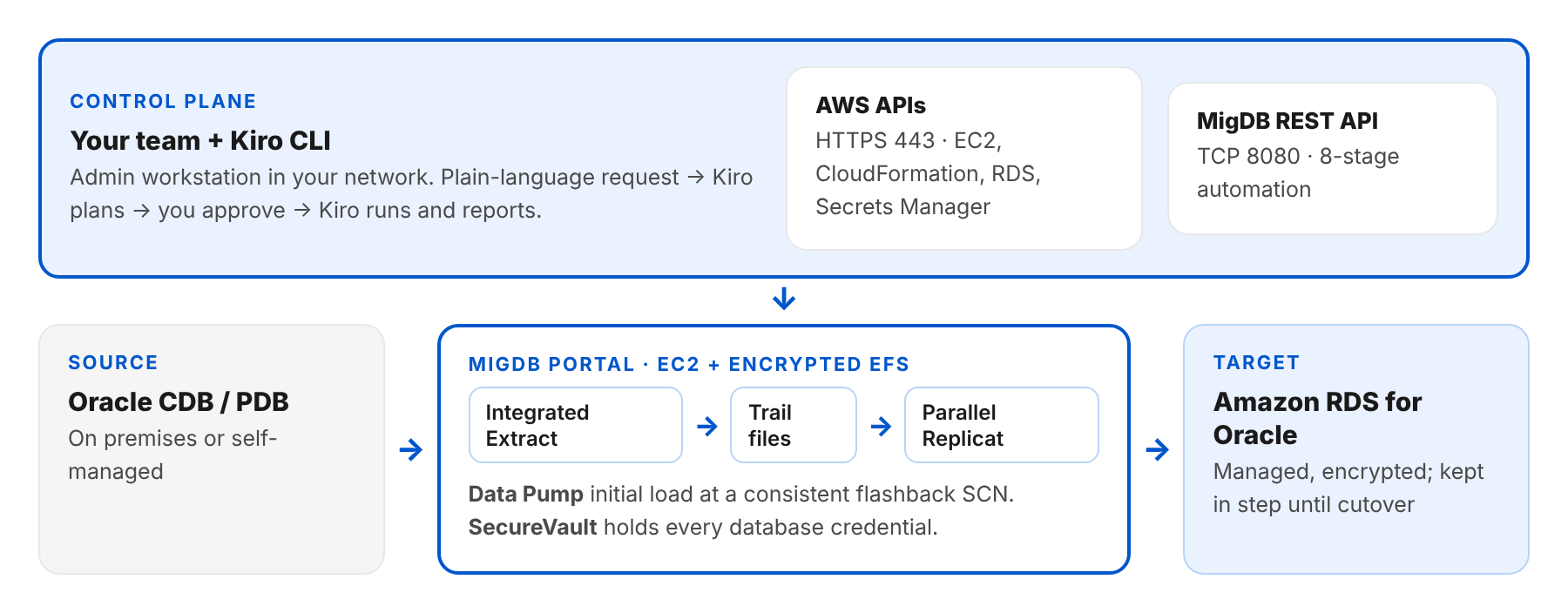
How it works: an architect’s view
Control plane. Kiro CLI runs in PowerShell on an administration workstation inside the customer network and uses that session’s AWS credentials. It calls AWS APIs over HTTPS and drives the MigDB portal through its REST API on TCP 8080.
Data path. The MigDB portal runs on Amazon EC2 with encrypted Amazon EFS storage and is deployed from a CloudFormation template. Over Oracle Net it captures changes with an Integrated Extract, takes a Data Pump export at a flashback SCN, imports it into Amazon RDS for Oracle and then applies ongoing changes with a Parallel Replicat. Rows that existed at the SCN arrive with the bulk load; later changes arrive through replication, so each change is applied once.
Security. Database credentials live in SecureVault aliases, and the portal admin password in AWS Secrets Manager. Nothing sensitive is typed into the chat or stored in the configuration file.
One command, eight stages, resumable
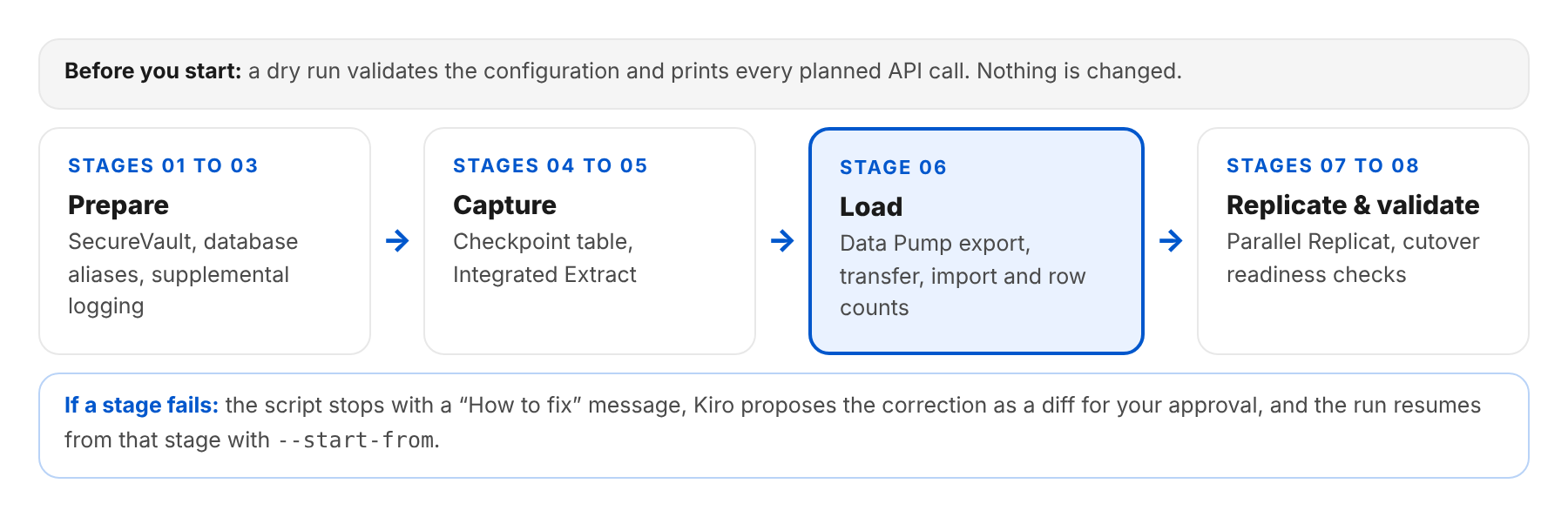
In the reference run, stage 04 stopped because a checkpoint table with the requested name already existed on the target. The operator asked Kiro to use the existing table; Kiro showed the one-line change as a diff, the run resumed from the checkpoint stage and completed successfully. No completed stage was repeated.
Results from the reference run
The import log is classified automatically. Of 282 messages, 269 were objects that already existed and 4 were grants that Amazon RDS does not permit, leaving DBAs a short list of 9 items to review instead of a raw log.
Figures are from SkyliftAI’s reference environment. Timings will vary with data volume and network.
Guardrails built in
- Dry runs first. The portal template is checked with a CloudFormation change set and the migration with a no-change dry run, before anything is created.
- Human approval. Kiro asks before it runs a command or changes a file, and shows file edits as a diff.
- No secrets in prompts. Credentials stay in AWS profiles, Secrets Manager and SecureVault; dry-run output masks passwords.
- Resumable state. Progress is saved after every stage, so a failure costs minutes, not a restart.
- Evidence for go-live. Row counts, a classified import log and cutover readiness checks are produced for every run.
Getting started
- Set up the workstation. Install the AWS CLI, Python and Kiro CLI, and configure an AWS profile.
- Provision if needed. Deploy a MigDB portal with CloudFormation and create the Amazon RDS for Oracle target.
- Run the pre-flight checks. Confirm the portal is healthy, dry run the automation and test every database connection.
- Migrate and cut over. Run the eight stages, review the import log, and switch the application once replication lag reaches zero.